
 FAQ
The questions we hear most when you consider adoption,
answered up front.
How is this different from the general-purpose AI we already use?
Using it feels the same as a personal AI, but every request passes through the guardrails, records, and budgets your company sets. We manage use instead of blocking it.
Personal AI
- Account
- Each employee's personal account
- Results
- Stay in the personal account
- Usage records
- Stay in the personal account
- Company rules
- Separate from company rules
VICS products
- Account
- Company account
- Results
- Collected in one organizational repository
- Usage records
- Full-text record of user, time, model, request and response
- Company rules
- Guardrails, per-organization budgets and limits apply
Budgets are assigned per organization first, and execution stops when a limit is reached.
Which of the four products fits our company?
Choose the product that fits your biggest concern right now. If you are not sure where to start, talk to us through the AI adoption check or an adoption inquiry.
- Yurika
For organizations that need AI every employee can use for work right away
- AgentWorks
For IT and development teams that want to build and run the agents they need
- AIOps
For IT operations teams flooded with alarms where finding the cause depends on a few experts
- AIRouter
For development teams where separate contracts, keys and security reviews per provider make model changes and cost control hard
Can the products be used together?
Yes. You can use just one, or pick and combine as many as you need.
- Yurika+AgentWorks+AIOps+AIRouterUse one · or together
The four products each handle a different job, so combine only what you need
- Yurika+AIRouterPeople's AI + systems' AI
Employees use Yurika for their work, while AI calls made by services and business systems are managed with AIRouter
- Yurika+AgentWorksThe using side + the building side
Employees use Yurika right away, and the agents you need are built and run with AgentWorks
- AgentWorks+AIOpsSame foundation
AIOps is built on the AgentWorks infrastructure, so the two share the same foundation
Which combination fits is something we advise on after reviewing your work environment in a consultation.
How much does adoption cost?
We do not post fixed prices on the website, because cost depends on the scale of adoption, the delivery model, and usage. Below you can see at a glance how cost is decided and what we discuss for each product. Send us an inquiry and we will advise based on your situation.
- Scale
Number of users · departments · range of systems to connect
- Delivery model
Cloud (SaaS) · hybrid · on-premises. If you have infrastructure requirements, we discuss a dedicated cloud setup
- Usage
How much AI you use (credits) and its limits. You can set budgets by organization and department
- YurikaDecided at contractNumber of usersAgent packs (base · industry · custom)Contract period 6 or 12 months
Contract after the 15-day trial; your trial environment carries over
- AgentWorksPricingDelivery modelDiscussed by scale
Available through public procurement (GS certified) · training, manuals and technical support included
- AIOpsStarting scopeNumber of target assetsRange of connections
Start light with SaaS, small with core assets · dedicated environment by discussion
- AIRouterChecked at consultationAI providers in useMonthly AI cost scale
Existing provider contracts stay as they are · we explain how adoption cost is estimated
What happens after I send an inquiry?
After you send an inquiry, a specialist will contact you to review your work and security environment. We then propose the products and delivery model you need, and explain how to proceed following the adoption steps on each product page (for example, a pilot followed by expansion).
- 1Adoption inquiry
Leave your company and questions in the adoption inquiry form.
What you gainA channel where our team answers you directly - 2Consultation · Proposal
Our team contacts you, checks your work and security environment, and proposes the products and adoption method you need.
What you gainAn adoption method that fits your environment - 3Request a trial
Leave your company information and number of users, and after review we open a trial environment for you.
What you gainAn environment you can start right away without installation - 415-day trial
Invite colleagues with trial credits and handle real work with the base packs.
What you gainConfirming that it works for your work - 5Contract · activation
Decide the number of users, packs and contract period (6 or 12 months). Your trial environment and data carry over as they are.
What you gainWork that carries over without moving - 6Add packs · expand
Add department and industry packs, and build custom packs together if needed.
What you gainAn AI that fits your company better the more you use it
I don't know where to start checking.
Start with the AI adoption check in the library. The quick check takes about 3 minutes and the full check about 5 minutes, and your answers are not saved or sent.
You can move from the check results to an adoption consultation, and settling the four items below beforehand speeds up the conversation (based on a Yurika trial request).
- Number of users
The department that will start first and the approximate headcount
- First tasks
Two or three tasks that are repetitive or take a long time
- Company templates
Templates you actually use, such as reports, presentations, and official documents
- Systems to connect
Work tools you use now, such as email, file servers, and calendars
Can I see a demo or videos of the products?
You can watch a roughly 2-minute introduction video for each product right below. Pick a product, then choose the language you want to watch in (한국어 · English · 日本語 · 中文).
The full demo videos (about 8–10 minutes each) are on the Resources page, and if you need a live demonstration, request a demo through the adoption inquiry.
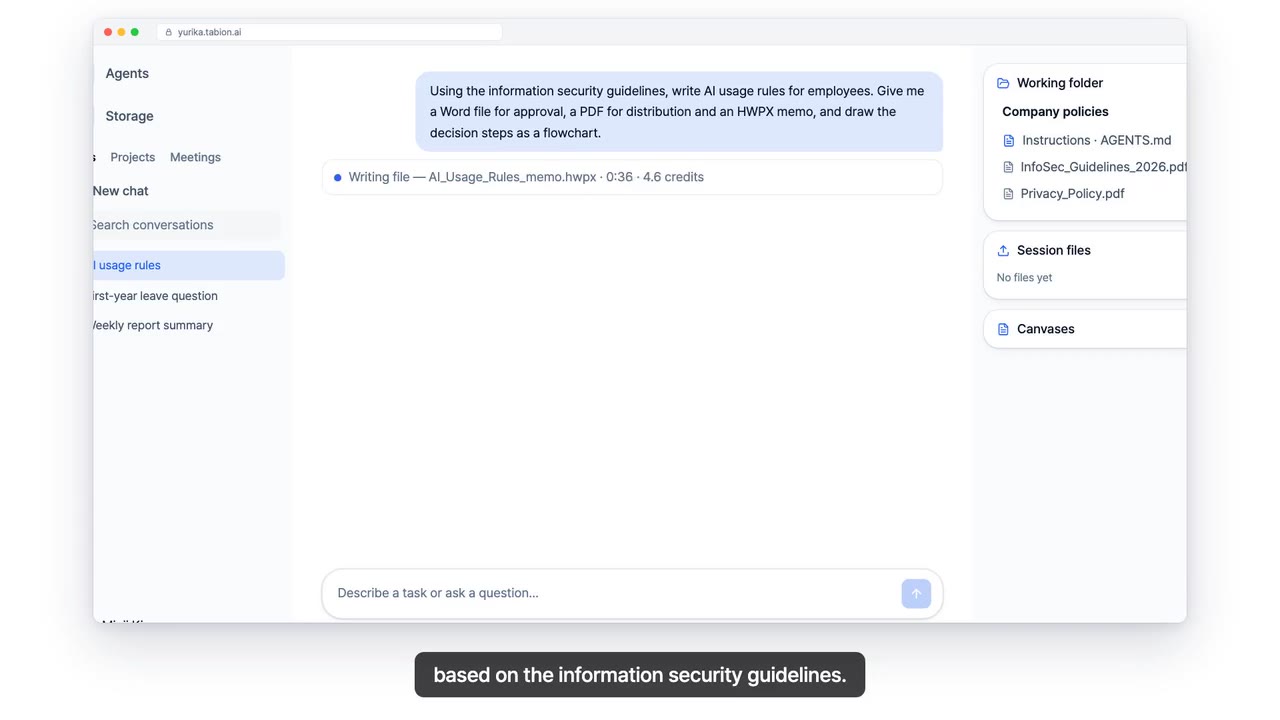
How do we manage employees working with personal AI accounts?
VICS products bring the AI that employees used with individual personal accounts into one environment the organization uses together. It goes beyond blocking by recording and controlling use.
- Employee
Uses a company account
One shared environment for the organization — safely protected
- Guardrails
Checks requests and responses · Blocks sensitive data
- Full-text records
User, time, model, request, response kept and searchable
- Results storage
Collected in the org repository Stays when staff change
- Administrator
Reviews records · Manages storage
If we connect internal documents, will people without permission see them?
VICS products gather company templates and reference materials in the organization's storage and manages accounts by linking them with your internal authentication. The viewing scope for each item is decided together in the adoption consultation.
- Authorized employee
Signs in with company account
- Internal auth link
Accounts linked to your · internal authentication
- Inside the scope · Can view
Only permitted materials can be opened
Unauthorized employee → Internal auth link → Outside the scope · Cannot view
Without permission, it does not open
- Added by admin · scope set in consultation
How is AI cost managed?
VICS products assign a budget to each organization first and stops execution when a limit is reached. All use is recorded, which reduces cases where you only find out when the bill arrives.
- Budget per organization
A budget is assigned first to each organization, such as sales, development, and general affairs.
- Stop at the limit
Execution stops when a limit is reached.
- Full-text records
Keeps user, time, model, request, and response, searchable by condition.
To bring multiple AI providers behind one gateway and set per-service limits and alerts, use AIRouter together with it. Standards for each department are decided in the adoption consultation.
Can it be used in closed-network or on-premises environments?
It differs by product. To use AI in an air-gapped network, AgentWorks installed on-premises is the fit, and the other products start as SaaS, with a customer-dedicated cloud configuration discussed when security requirements are high.
Three AgentWorks optionsThe more sensitive your data, the further left you go
- StrictestOn-premises
Runs on its own model without internet.
- BalancedHybrid
Sensitive work uses an internal model; commercial AI connects only to allowed addresses.
- Light startCloud
Pilot first, then switch to on-premises if needed.
Can the results AI creates be sent out as they are?
AI results are treated as drafts, and by default a person in charge checks the content before it is sent out. How to set up an approval step before sending is decided together in the adoption consultation.
- Sensitive data check
Checks requests and responses in both directions to block or warn.
- Full-text records
User, time, model, request, and response are kept so you can check later.
- Email link
Connecting a mail server through a connector lets results lead into sending email.
Can we build agents without developers?
Yes. AgentWorks is a no-code platform where you build agents on screen without code, so the business staff who know the work build and edit them directly. In the public sector case as well, it was configured through screen settings alone, with no code development.
There are four ways to build an agent, chosen to suit who is building it.
- Straight from chat
Specify a library and ask a question, and it becomes an agent as it is
- Design by talking
Enter the task as a sentence and AI designs the steps and even sets up the schedule
- Bundle as skills
Bundle writing rules and formats into skills so the whole department works at the same quality
- Open API
Call tasks through the API from dedicated apps or other systems
Can it connect to internal documents and systems?
Yes. You can connect internal documents, databases, and work systems to build agents that answer and work based on your organization's own data. The scope of connection differs by environment, so we confirm it together in the consultation.
There are four ways to connect, depending on the target.
- Library
Turns PDF, Word, HWP, and image (OCR) documents into searchable knowledge and shows the source document with each answer
- Dataset
Ask internal databases, Excel, and CSV questions in plain words without SQL and get answers as tables and charts
- Data connectors
Periodically syncs 9 types of storage such as S3, SFTP, shared folders, databases, and Redmine, so changes to the original are reflected automatically
- MCP · Open API
Connect your organization's internal tools through MCP, and existing work systems call agents through the Open API
How do we control an agent that does something wrong?
While an agent works on its own, execution safeguards and two layers of gateways keep running, so executions that exceed limits stop and every call is kept in the record. However, approval by a person in charge for irreversible actions and automatic recovery are still in preparation.
- Excessive execution prevention
Stops by itself when it exceeds repetition of the same action, the step count limit, or the execution time limit
- Cost cap
Blocks new runs when per-task token budgets or contract, period, and user limits are exceeded
- Personal data protection
Detects personal data at the input stage and blocks or masks it before running
AI calls pass through the two gateways below in order, and usage and outbound connections are kept in the audit record.
- Agent
Runs conversations and tasks
- AI Gateway
Permissions, limits, and usage records for who uses which model and how much
- Egress Gateway
Single path for external connections, connects only to allowed addresses and records them
What does AIOps do?
AIOps is an AI-based failure prediction and response product that warns of signs of failure early with supporting evidence, and when one occurs, carries on from root cause analysis through approved actions to confirming recovery. It is built on AgentWorks.
- Know in advance
Warns early with risk, confidence and evidence
After failure · Failure occurs: Alarms scatter and ring
Alarm groupingGroups scattered alarms into one situation
- Root cause
Cause, impact and response on one screen
- Safe actions
Acts only within the range people set
- Recovery check
Confirms recovery after the action
↺ Every judgment comes with evidence, and the operator's verdicts feed into the next judgment
Do we have to replace all our current monitoring tools?
No. AIOps leaves the monitoring tools you use now as they are and adds judgment on top. Monitoring tells you what crossed a threshold, and AIOps judges why, how far it extends, and what to do.
- What it receives
Receives alarms and metrics, logs, configuration information (CMDB), and change and deployment history.
- How it connects
Designed around standard methods such as webhooks, API, and syslog, with the scope of integration decided together in the current-state review.
- What it sends
Runs actions through automation tools and reports results through ticket and notification tools.
It does not hand everything to AI from the start; it begins in Approval mode and expands from there. For a first consultation, even a part of the following is enough: a list of the operations tools you use, two or three recent recurring failures, a server and equipment list, and some of your current runbooks.
- 1Current-state review
We look at the operations tools and asset configuration you use and set the connection points and scope.
What you gainWhere to connect and which failure types to handle first - 2Start in Approval mode
We start with core assets, and every action runs only after the operator approves it.
What you gainAI judgments verified against your own metrics - 3Autonomy for low-risk actions
Automatic execution is allowed only for low-risk actions of types whose accuracy has stabilized.
What you gainLess burden of night and holiday response - 4Expand the scope
Based on recovery confirmation results and accumulated knowledge, we widen the targets and scope.
What you gainOperations expanded while watching the metrics
When is AIRouter needed?
You need it when attaching AI models to multiple services raises concerns about cost control, provider management, and leaking costs. AIRouter solves these through a single gateway that every AI request passes through.
- Cost known from the bill
Set a budget limit for each service key, alert before the limit is reached, and stop calls when it is reached.
- Separate for each provider
Connect with one service key and a standard API, and keep using your existing provider contracts.
- Leaking costs
Checks request records every 5 minutes and tells you which costs can be reduced and how.
Does it also manage employees using websites like ChatGPT directly?
AI that employees use directly on websites does not pass through AIRouter, so it is not managed. AIRouter manages the gateway through which services, work systems and agents call AI models; for employees' work AI, please also consider Yurika.
When employees use websites directly
- Who calls
- Individual employees
- Gateway
- Does not pass through
- Managed by AIRouter
- Not managed
- Product to consider together
- Yurika
When going through AIRouter
- Who calls
- Services · work systems · agents
- Gateway
- Called with a service key, so every request passes the gateway
- Managed by AIRouter
- Managed
- Product to consider together
- AIRouter
How do you get started with AIRouter?
AIRouter starts lightly as SaaS. You get a service key and connect right away, keep using your existing provider contracts, and organizations with high security requirements can discuss a customer-dedicated cloud configuration.
- 1Current-state review
We look at which services use which providers and where keys and costs are managed.
What you gainStatus of scattered AI calls and keys - 2Connect one service
In existing code, change only the address and key to connect, and turn guardrails on in record-only mode first.
What you gainChange the address and key back to return to the original - 3Turn on policies
Set budget limits and routing presets, and switch rules whose impact you have checked to blocking.
What you gainOperations within budget and security standards - 4Expand to other services
Split workspaces and service keys by department and project and expand under the same policies.
What you gainOperations that see all AI calls in one place
For a first consultation, even a part of the following is enough: the AI providers you use, a list of services that call AI, your monthly AI cost scale, and your security standards. Request bodies are stored only when the organization turns this on, for the period it sets.
How do I get the brochures?
You can get the company profile and the four product brochures in Resources. Jump straight to the one you want below. Before downloading, enter your company name, name, and company email (required) and mobile number (optional), and you can download the file in Korean, English, Japanese, or Chinese.
How is the information I enter in inquiries or material requests used?
The information you enter is used to answer your inquiry and guide you to materials. Product news (newsletters) is sent only to people who have separately agreed to receive marketing information.
- Responding to inquiries
Passed to the person in charge and used to reply to your inquiry.
- Guiding you to materials
We send the materials you requested and guide you through them.
- Product news
Product news, events and newsletters are sent only if you agreed to receive marketing information.
- Rest assured
We currently do not provide it to third parties, and you can request access, deletion or withdrawal of consent at any time.
Receiving marketing information is optional. You can still send an inquiry or request materials without checking it. Your answers in the AI adoption check are not stored or sent.
Can I see adoption cases from similar companies?
The Solutions page shows deployment cases from finance, public sector, manufacturing, HR, and overseas. Each case summarizes the customer's challenge and how we solved it.
What is wise.on?
wise.on is the name of the AI Platform product introduced by VICS Technology. Today we provide enterprise AI agents under the product family.
- 2023
Launch of the wise.on cloud automation platform
- 2024
Launch of wise.on AI Platform
- 2026
Launch of AgentWorks, an AI Agent build and operations platform
- Today
Yurika · AgentWorks · AIOps · AIRouter
What are VICS enterprise AI agents?
VICS Technology makes the following enterprise AI agent products.
- Yurika: a work AI agent your whole organization uses together.
- AgentWorks: a no-code AI agent platform that works even in closed networks.
- AIOps: AI failure prediction and response that warns you first.
- AIRouter: an AI gateway that ties many AI models into one API.
Do I need to install VICS AI agents? How does setup work?
It differs by product.
- Yurika: starts as SaaS, with no installation.
- AIRouter: starts lightly as SaaS. You get a service key and connect right away.
- AgentWorks: to use it in a closed network, the on-premises installation is the fit.
Organizations with high security requirements can discuss a customer-dedicated cloud configuration. Talk to us through an adoption inquiry to find the right way for your organization.
If you don't find your answer, send us an inquiry and a specialist will reply directly.
Contact us